
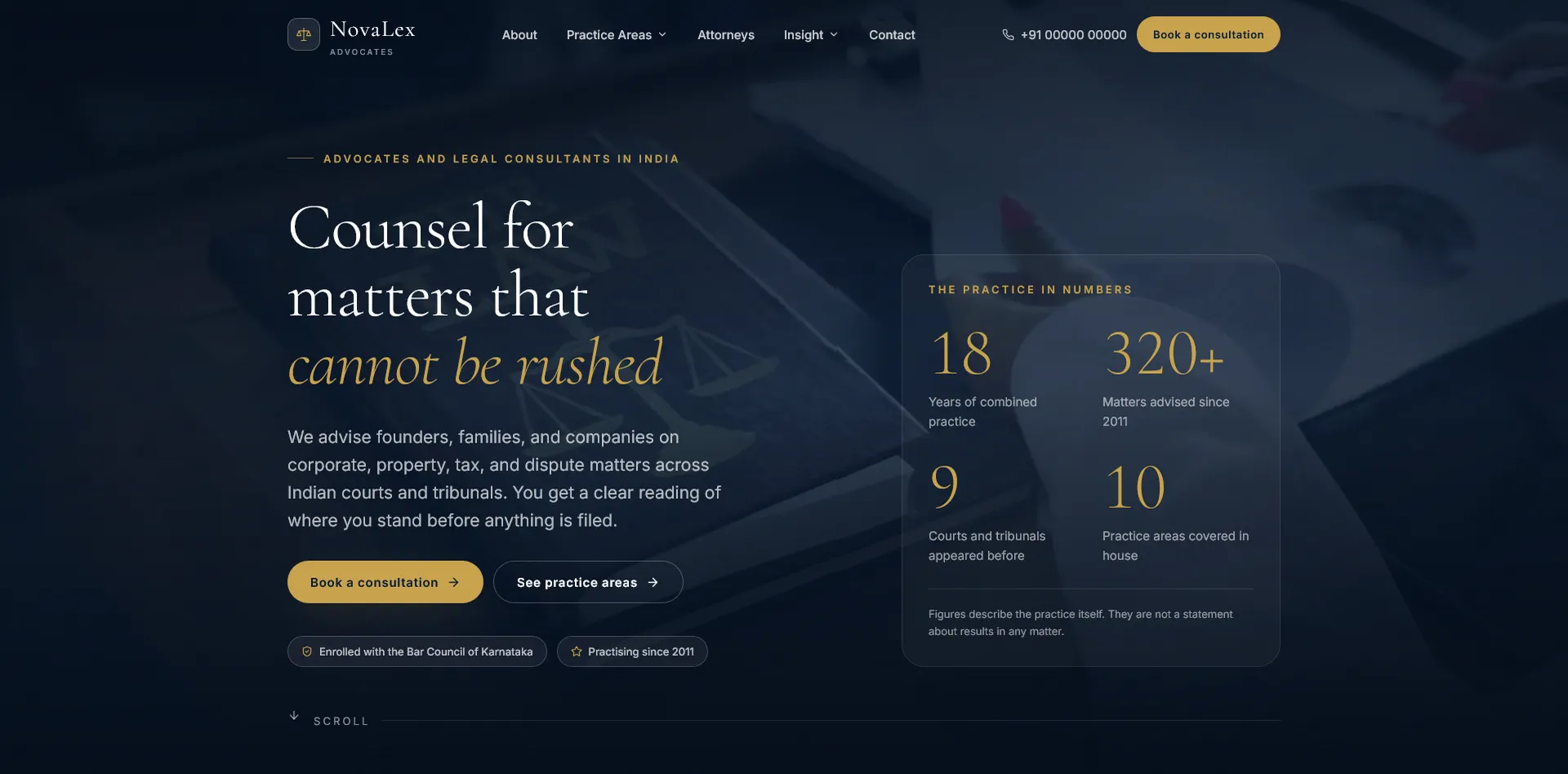
NovaLex Law Firm Website Template
NovaLex is a polished, ready to customize website template for law firms, advocates, legal consultants, chambers, and professional legal service providers. It is built with React, Vite, and Tailwind CSS, and it comes with a complete static website structure that can be deployed on almost any modern hosting platform.
This template is designed for buyers who want a professional legal website without starting from a blank screen. The layout is clean, premium, fast, responsive, and written with care, trust focused copy that suits legal and professional service businesses.
Why Purchase NovaLex?
NovaLex gives you a complete law firm website that already includes the pages, sections, content structure, legal policy pages, SEO setup, and responsive design a serious legal business needs. It is not just a landing page. It is a full website template with multiple routes, reusable content files, optimized assets, and a production build system.
- Professional legal website design
- Clean and trustworthy visual style
- Built for advocates, law firms, legal consultants, and chambers
- Fully responsive for desktop, tablet, and mobile
- Static prerendered pages for better speed and SEO
- Reusable content structure for easy editing
- Modern React and Tailwind CSS codebase
- Includes legal pages, contact forms, attorney profiles, practice areas, and more
What You Will Get
- Complete React website source code
- Vite project setup
- Tailwind CSS design system
- Responsive homepage
- About page
- Practice areas page
- Attorney profiles page
- Matter notes page
- Client feedback page
- FAQ page
- Contact page
- Book consultation page
- Privacy policy page
- Terms and conditions page
- Cookie policy page
- Disclaimer page
- Legal notice page
- Refund policy page
- Cancellation policy page
- Accessibility statement page
- 404 page
- Sitemap generation
- Robots file generation
- SEO metadata system
- Schema markup support
- Optimized media handling
- Sticky navigation with dropdown menus
- Mobile drawer menu
- Entry notice modal
- Reusable form components
- Custom validation messages
- Reusable layout and UI components
Main Features
- Premium legal design: The design uses a calm, professional layout with strong typography, refined spacing, and a serious visual tone suitable for legal services.
- Static prerendering: Every route is rendered into real HTML during build, which helps search engines and improves first load experience.
- SEO ready: The template includes page titles, meta descriptions, canonical URLs, Open Graph metadata, Twitter metadata, structured schema, sitemap, and robots file generation.
- Reusable content files: Most website content lives inside data files, making it easier to edit practice areas, attorneys, office details, FAQs, legal pages, and navigation links.
- Responsive navigation: Desktop users get a polished menu with practice area and insight dropdowns. Mobile users get a full screen drawer menu.
- Legal service pages: Practice areas are already structured for corporate law, property law, family law, litigation, criminal defence, taxation, arbitration, intellectual property, startup legal services, and employment law.
- Attorney profiles: Add advocate details, roles, education, languages, courts, and profile images.
- Contact and consultation forms: Includes polished form UI, validation states, error summaries, and success messages.
- Policy pages included: The package includes common legal and website policy pages so the buyer does not need to design them separately.
- Media optimization workflow: The project includes a script to generate optimized web images and video assets from source media.
Pages Included
- Home
- About
- Practice Areas
- Attorneys
- Client Feedback
- Matter Notes
- FAQ
- Contact
- Book Consultation
- Privacy Policy
- Terms and Conditions
- Cookie Policy
- Disclaimer
- Legal Notice
- Refund Policy
- Cancellation Policy
- Accessibility Statement
- 404 Not Found
Technology Stack
- React 19
- Vite 6
- Tailwind CSS 3
- React Router 7
- Lucide React icons
- PostCSS
- Autoprefixer
- Static HTML prerendering
Requirements
- Node.js installed on your computer
- npm installed with Node.js
- A code editor such as VS Code
- Basic knowledge of editing React and JavaScript files
- Any static hosting provider for deployment
How To Install
- Extract the downloaded project files.
- Open the project folder in your code editor.
- Open a terminal inside the project folder.
- Run
npm installto install all dependencies. - Run
npm run devto start the local development server. - Open the local URL shown in the terminal.
- Edit the website content and branding as needed.
- Run
npm run buildto create the production version. - Upload the contents of the
distfolder to your hosting server.
Important Base Path Note
The project has a single base path setting inside site.config.js. If you want to host the website from a subfolder, keep or update the base path there. If you want to host it from the main domain root, change the base path to /.
How To Edit The Website
- Edit firm name, email, phone, office details, social links, and general identity inside
src/data/site.js. - Edit practice areas inside
src/data/practices.js. - Edit attorney profiles inside
src/data/attorneys.js. - Edit FAQs and insights inside
src/data/insights.js. - Edit testimonials and matter notes inside
src/data/testimonials.js. - Edit policy page content inside
src/data/legal.js. - Edit global styling and reusable component classes inside
src/styles.css. - Edit routes inside
src/App.jsxandscripts/prerender.mjsif you add new pages. - Replace images and videos through the media folder or by using the included media optimization workflow.
Forms And Backend Note
The contact and consultation forms are designed as front end forms with validation, error messages, and success states. They do not send data to a server by default. To make the forms submit real enquiries, connect them to your own backend, email service, CRM, or form handling service.
For secure production use, the receiving server should validate all form data again, protect against spam, rate limit requests, and use captcha or CSRF protection where needed.
Deployment
After running npm run build, the final production website is generated inside the dist folder. You can deploy that folder to most static hosting services, including shared hosting, VPS hosting, Netlify, Vercel, Cloudflare Pages, or any server that can serve static HTML, CSS, JavaScript, and media files.
Included Build Commands
npm run devstarts the development server.npm run buildbuilds the client, builds the server render bundle, prerenders all routes, and generates sitemap and robots files.npm run previewpreviews the production build locally.npm run mediaregenerates optimized media assets from the source media folder.
License
You may use this template for personal and commercial projects. You may customize it for yourself or for your clients.
You may not resell, redistribute, share, upload, or include this template as a competing product, template bundle, marketplace item, or downloadable source code package. The license allows use in finished websites, not resale of the original script or modified script as a template.
Who This Template Is For
- Law firms
- Advocates
- Legal consultants
- Legal chambers
- Corporate law practices
- Startup legal advisors
- Property law consultants
- Litigation practices
- Professional service businesses that want a serious and polished website
Why NovaLex Is A Good Choice
NovaLex saves development time and gives you a strong professional starting point. The design already feels credible, the content structure is practical, the pages are ready, and the build system produces fast static output. Instead of paying for a fully custom website from scratch, buyers can start with NovaLex, replace the placeholder details, connect the forms, and launch a polished legal website much faster.
If you want a refined legal website template that looks professional, loads fast, and is built with a modern React stack, NovaLex is a strong choice.