
MediaFlow — Your Personal Stock Media Assistant for Windows
Stop hunting for stock photos across a dozen browser tabs. MediaFlow searches Pexels, Pixabay and Unsplash at the same time, filters out the blurry and duplicated results, downloads everything in one go, and hands you web‑ready WebP or AVIF files organised into tidy project folders all on your own computer.
What used to be an hour of searching, downloading, renaming and running images through an online compressor is now one search box and one click.
🎁 Free for a limited time
MediaFlow is normally a paid, one‑time purchase. For a limited period you can get a full licence at no cost. There is no subscription, no monthly fee and no trial that expires on you. Claim your licence key now and it stays yours, including free updates.
Why you need MediaFlow
If you build websites, run an online shop, publish content or manage social media, you already know the routine. Search one stock site. Not quite right. Try another. Download a 6 MB JPEG. Upload it to a compression tool. Download it again. Rename it. Repeat forty times.
That routine costs hours every week, and it quietly damages your site. Oversized, unoptimised images are one of the most common causes of slow page loads, which hurts your Core Web Vitals, your search rankings and your conversion rate.
MediaFlow fixes both problems at once:
- Saves hours of repetitive work. One search covers three of the largest free stock libraries in the world.
- Makes your site faster. Every image arrives resized, compressed and converted to modern formats, ready to upload.
- Protects your quality bar. Blurry, low‑resolution and duplicate images are rejected before they ever reach your folder.
- Keeps your work private. Everything runs on your machine. No account, no uploads, no tracking.
How it works
- Type a topic. Enter what you need - “modern office”, “coffee shop”, “mountain sunrise” and choose how many images and videos you want.
- MediaFlow does the work. It expands your keywords, searches every enabled provider, ranks the results by quality and downloads the best ones.
- Collect your folder. Optimised images, compressed videos, thumbnails, poster frames and a manifest file, all neatly organised and ready to use.
Every feature, in detail
Search three libraries at once
- Simultaneous search across Pexels, Pixabay and Unsplash
- Smart keyword expansion with synonym substitution finds results a single literal search would miss
- Enable or disable any provider individually
- Built‑in connection testing so you always know a provider is reachable
- Results de‑duplicated across providers, so the same photo never lands twice
Quality filtering that protects your standards
- Blur detection rejects soft, out of focus images automatically
- Perceptual duplicate detection catches near‑identical shots, not just exact copies
- Minimum resolution enforcement so nothing unusable slips through
- Optional AI‑generated image filter when you want authentic photography only
- Orientation preference favour landscape shots for hero banners and headers
- Intelligent ranking weighs resolution, aspect ratio, popularity and source reliability so the best results arrive first
Professional image optimisation
- Convert to WebP, AVIF or JPEG
- Emit AVIF alongside WebP for maximum browser coverage
- Resize to a maximum width, from 320 px up to 8192 px
- Adjustable quality from 30 to 100, balance file size against fidelity
- Metadata stripping removes EXIF data, shrinking files and protecting privacy
- Automatic thumbnail generation for galleries and listings
- Powered by sharp and libvips, among the fastest image pipelines available
Video download and compression
- FFmpeg is bundled nothing to install, nothing to configure
- Resolution capping from 240p to 4320p
- Full CRF quality control (0–51) for precise size versus quality tuning
- Encoding presets from ultrafast to veryslow
- Automatic poster frame extraction for video thumbnails
- Audio handled correctly, with sensible bitrate defaults
Download control that respects your connection
- Parallel downloads, from 1 to 16 at a time
- Separate concurrency control for CPU‑bound optimisation
- Bandwidth limiting so a big batch never saturates your line
- Automatic retries with exponential backoff on flaky connections
- Pause, resume and cancel any job at any moment
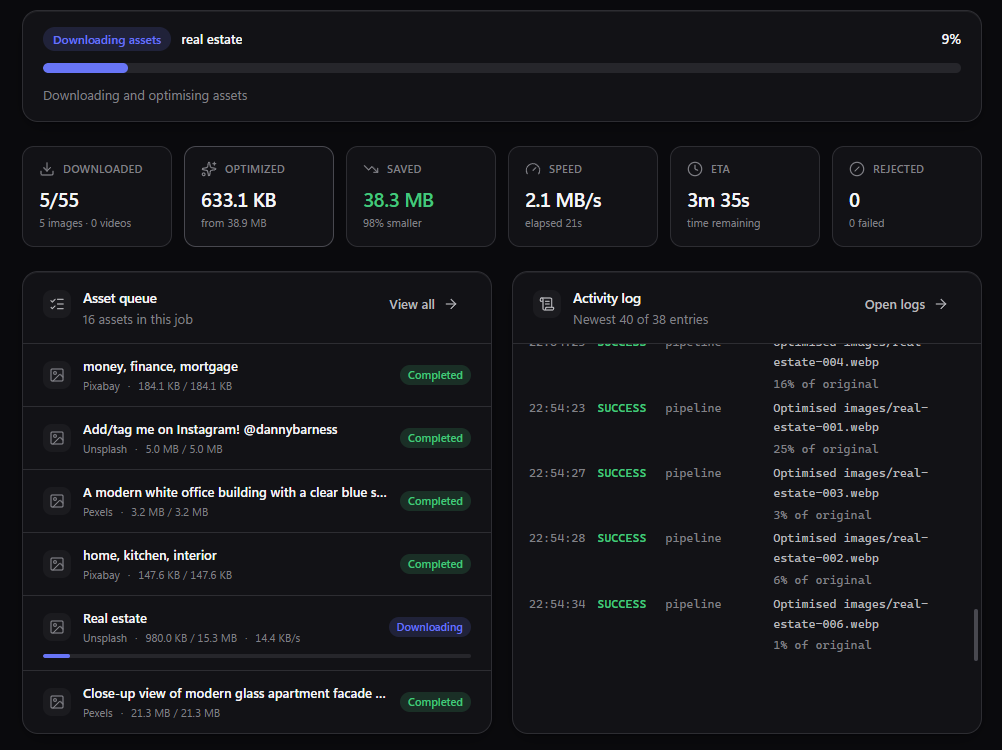
- Live progress with per‑file speed and estimated time remaining
- Configurable network timeouts
Organisation and output
- Every job creates a clean project folder, sorted into
images,videos,originals,thumbnailsandmetadata - SEO‑friendly file names generated from your topic. No more
pexels-photo-1234567.jpg - A
manifest.jsonrecords every asset, its source, its author and its licence - Attribution details captured automatically, so crediting photographers is effortless
- Original files preserved alongside the optimised versions
- Complete job history, with one click access to any past project folder
Privacy and security by design
- No account required. No sign‑up, no cloud, no profile.
- No telemetry. Nothing about your work is collected or transmitted.
- Your API keys are sealed in the operating system credential vault. Windows DPAPI.
- Keys are never displayed, exported or sent anywhere except the provider they belong to
- All processing happens locally; your files never leave your computer
- Hardened Electron configuration with context isolation, a sandboxed interface and a strict content security policy
An interface built for real work
- Clean, modern design in dark, light or automatic theme
- Full keyboard shortcut support
- Live activity log with export, for when you need to see exactly what happened
- Desktop notifications when a job finishes
- Optionally open the output folder the moment a job completes
- Built‑in updates. New versions are verified and installed from inside the app
Who MediaFlow is for
- Web developers and agencies assembling image sets for client sites
- WordPress, Shopify and WooCommerce owners who need fast‑loading product and blog imagery
- Content writers and bloggers illustrating articles at volume
- Social media managers building a content bank for the month ahead
- Designers gathering mood boards and placeholder assets
- Video editors sourcing B‑roll without a stock subscription
Built on a modern, professional stack
- Application Electron 43 - native desktop performance
- Interface React 19 with TypeScript and Tailwind CSS 4
- Image engine sharp, powered by libvips
- Video engine FFmpeg and FFprobe, bundled
- Sources Pexels, Pixabay and Unsplash official APIs
- Credential storage Operating system keychain
- Platform Windows 10 and 11, 64‑bit
What you need to get started
MediaFlow uses the official APIs of each stock library, so you supply your own free API key for each provider you want to use. Registration takes about a minute per site and costs nothing. The app links you straight to each signup page. This keeps your usage under your own account and your own generous free quota.
Frequently asked questions
Is MediaFlow really free?
For a limited time, yes. MediaFlow is normally sold as a one‑time purchase with no recurring fees. During this promotion you receive a full licence at no cost, and it remains valid afterwards.
Do I need a subscription to Pexels, Pixabay or Unsplash?
No. All three offer free API access. You register for a free key on each site and paste it into MediaFlow once.
Can I use the images commercially?
Each provider sets its own licence terms, and all three are generous for commercial use. MediaFlow records the source, author and licence for every asset in a manifest file, and displays each provider’s attribution requirements inside the app.
Does it work offline?
Searching and downloading need an internet connection, but image and video processing runs entirely on your own machine.
Will it slow down my computer?
You control it. Download and optimisation concurrency are both adjustable, and you can cap bandwidth so a large batch never interferes with anything else.
How many devices can I use my licence on?
Your licence activates a set number of devices. You can release a device at any time from Settings, then activate a new one — useful when you upgrade or replace a computer.
Licence and permitted use
Your MediaFlow licence covers personal and commercial use. Use it for your own projects, for your business, or for work you deliver to paying clients on unlimited projects, with unlimited downloads.
You may:
- Use MediaFlow for personal projects of any kind
- Use it commercially for your own business, your own products and your own websites
- Use it on client work and deliver the resulting media to clients
- Run unlimited jobs and download unlimited assets
- Install it on the number of devices your licence permits, and move a device whenever you need to
You may not:
- Resell, resell‑as‑a‑service, rent, lease or sublicense MediaFlow
- Redistribute or share the installer, whether free or paid
- Share, publish or transfer your licence key
- Repackage, rebrand or bundle MediaFlow into another product
- Upload it to file sharing sites, torrents or software repositories
In short: use it as much as you like, for anything you like. Just do not sell or give away the software itself.
About the media you download
This is a separate matter, and an important one. The images and videos MediaFlow downloads are not covered by your MediaFlow licence. They are governed by the terms of the library they came from. Pexels, Pixabay and Unsplash all permit commercial use under their own generous licences, and none of them require payment.
MediaFlow helps you stay compliant automatically: every download is recorded in a manifest file with its source, photographer and licence, and each provider’s attribution requirements are shown inside the app. Unsplash, for example, asks that you credit the photographer.