
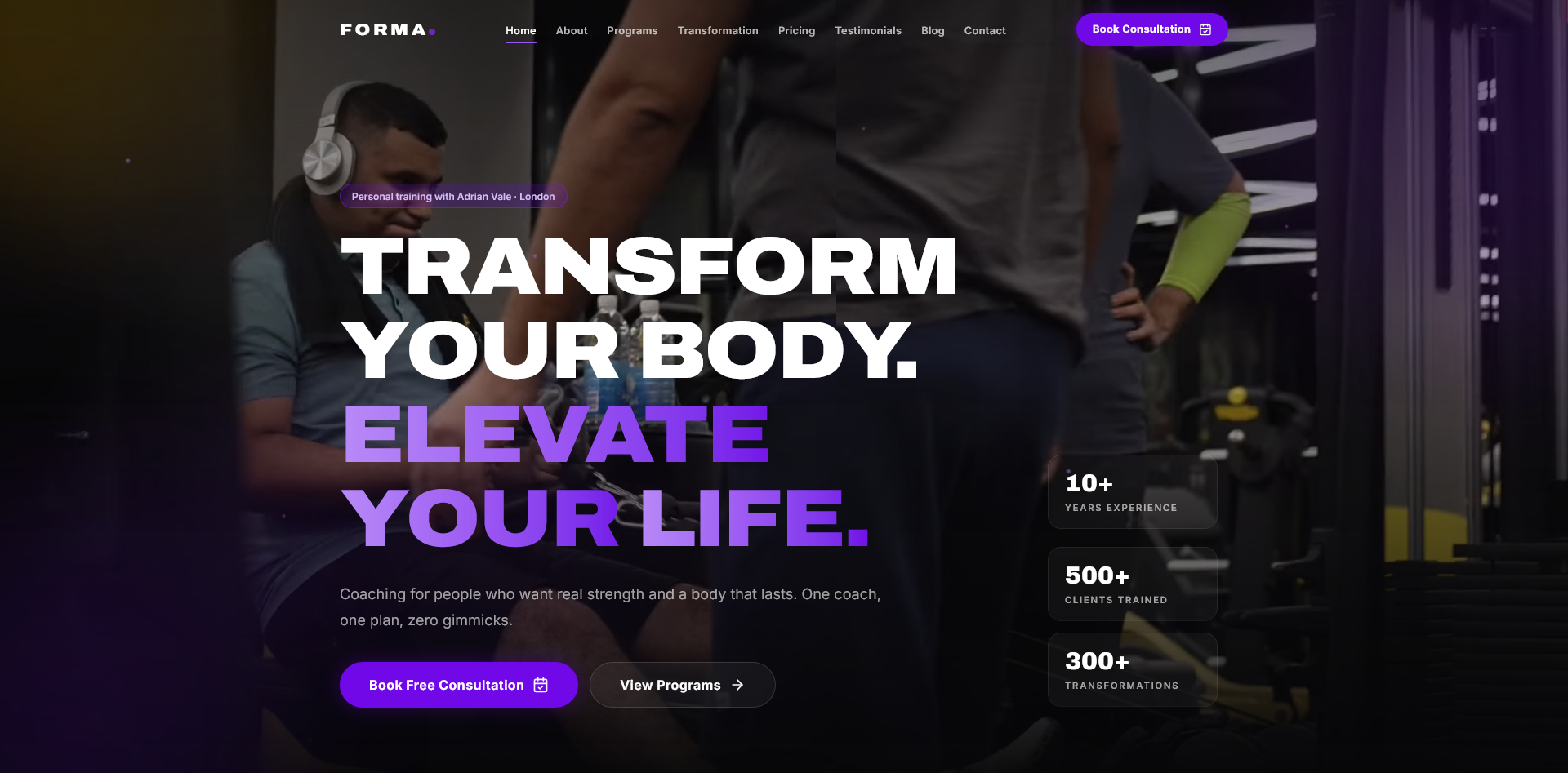
FORMA Personal Trainer Website
FORMA is a polished fitness website for personal trainers, private coaches, gym studios, and online fitness businesses. It gives you a complete ready made web presence with programs, pricing, transformations, testimonials, blog content, FAQs, contact forms, and legal pages in a clean professional layout.
The website is built with reusable React components, smooth animations, optimized media, SEO support, sitemap, robots file, and Apache clean URL support. It is easy to customize for your own coach profile, services, pricing, images, videos, testimonials, and contact details.
Technology Stack
- Node.js
- Vite 6
- React 19
- TypeScript
- Tailwind CSS 4
- Framer Motion
- Lenis smooth scroll
- Swiper
- React Router 7
- React Hook Form
- Zod validation
- Lucide React icons
- Sharp media processing
- Apache htaccess support
Requirements
- Node.js 20 or newer recommended
- npm 10 or newer recommended
- Apache server with rewrite module enabled
- Modern browser such as Chrome, Edge, Firefox, or Safari
- Basic knowledge of editing project files
Installation Instructions
- Extract the project ZIP on your computer.
- Open the project folder in your code editor.
- Open
vite.config.ts. - Change the Vite
basevalue to match your upload folder. - Open a terminal inside the project folder.
- Run
npm install. - Run
npm run build. - Upload the
distfolder and.htaccessfile to your server folder. - Open the website from your configured URL.
Important Vite Base URL Setup
Before building the website, you must update the base value in vite.config.ts. This tells Vite where the built CSS, JavaScript, images, and videos will load from.
If your website will open from:
https://example.com/trainer/Use this base value:
base: '/trainer/dist/',If your website will open from:
https://example.com/fitness/Use this base value:
base: '/fitness/dist/',If your website will open from the main domain:
https://example.com/Use this base value:
base: '/dist/',After changing the base value, always run:
npm run buildExample Vite Config
import { fileURLToPath, URL } from 'node:url';
import { defineConfig } from 'vite';
import react from '@vitejs/plugin-react';
import tailwindcss from '@tailwindcss/vite';

export default defineConfig({
  base: '/trainer/dist/',
  plugins: [react(), tailwindcss()],
  resolve: {
    alias: {
      '@': fileURLToPath(new URL('./src', import.meta.url)),
    },
  },
});
Upload Structure For Demo
For a demo URL like:
https://example.com/trainer/Upload files like this:
trainer/
  .htaccess
  dist/
    index.html
    assets/
    media/
    robots.txt
    sitemap.xml
Development Commands
npm installinstalls all dependencies.npm run devstarts the local development server.npm run buildcreates the production build.npm run previewpreviews the production build.node scripts/build-media.mjsregenerates optimized media files.
How To Edit Content
Website content is organized inside the src/content folder. You can update the brand name, coach details, contact information, programs, pricing, testimonials, FAQs, blog posts, and legal content without editing the main layout components.
How To Update Media
Images and videos are managed through an optimized media workflow. After replacing source media, run:
node scripts/build-media.mjsThis creates optimized images, videos, posters, blur placeholders, and updates the generated media manifest used by the website.
Forms
The booking and newsletter forms include custom validation messages and honeypot spam protection. The forms currently simulate submission on the frontend. To receive real enquiries, connect the forms to your backend, email service, automation tool, or CRM.
SEO Setup
The project includes SEO meta handling, schema support, sitemap, robots file, optimized media, and production ready asset output. Before publishing, update the website URL, business details, canonical URL, and social share image path.
Deployment Notes
- The production build is created inside the
distfolder. - The included
.htaccessfile supports clean URLs and page refreshes. - Apache rewrite module must be enabled.
- If assets do not load, check the
basevalue invite.config.ts. - After every base URL change, run
npm run buildagain.
Security Notes
- Validate real form submissions again on the server.
- Do not expose private API keys in frontend code.
- Use HTTPS for production websites.
- Add rate limiting when connecting real forms.
- Keep dependencies updated.
Troubleshooting
- If styling is missing, check the Vite base URL and run
npm run buildagain. - If clean URLs do not work, enable Apache rewrite module.
- If page refresh shows a 404 error, confirm that
.htaccesswas uploaded. - If forms do not send emails, connect a backend or email service.
- If media does not update, run
node scripts/build-media.mjs --force.